
How to Improve your App's AI Discoverability in 2026
Three tips that will bring more human and AI traffic

Most SaaS apps still treat discoverability like it’s 2015. You set a <title>, you set a meta description, you check Google Search Console once a quarter, and you call it done. But in today’s AI dominated landscape, a growing slice of product discovery traffic now comes from agents and LLMs (ChatGPT search, Perplexity, Claude), and those tools look for slightly different signals than Googlebot ever did.
The good news is that the fixes aren’t hard. There are basically three things to add, and once they’re in place your app is in much better shape for both classic search and the AI side of things.
Three building blocks every SaaS app should have in 2026:
- Prerendered HTML on marketing pages (e.g. landing pages) so crawlers see your content without running JavaScript.
- JSON-LD structured data so search engines and LLMs understand what your app actually does.
- An
llms.txtfile in your so AI tools have a curated map of your site.
We just added all three to Open SaaS, our free, open-source SaaS boilerplate starter built on Wasp. Snippets below show exactly what we ship, and they’re easy to copy into any stack.
Why the old playbook isn’t enough
Section titled “Why the old playbook isn’t enough”
If your app is a Single Page Application (which most React, Next.js, Vue, and Svelte apps are by default), the initial HTML the server returns is mostly empty. The real content gets injected by JavaScript after the page loads it in the browser.
Googlebot (Google’s site indexer) is actually decent at getting around this problem now. It runs JS, waits for the page to settle, and indexes what it finds. The problem is that most other crawlers are not so patient:
- Bingbot, DuckDuckBot, and other classic crawlers either skip JS or render unreliably.
- AI-side crawlers (OAI-SearchBot, PerplexityBot, ClaudeBot, and others) have inconsistent and generally limited JS rendering compared to Googlebot, so you shouldn’t assume your client-rendered content is reachable.
- LLMs answering a user’s question often pull from cached snapshots or
curlrequests that were taken without JS execution at all.
So if the only place your value prop, pricing, and FAQ live is inside a React component that mounts client-side, you’re basically invisible to a large chunk of the traffic you want.
Here are the three things you can do to fix that, in order of impact:
- Get your valuable content into the HTML the server sends.
- Tell crawlers what kind of app/site you have using structured data.
- Give LLMs a clean, curated index of your site.
1. Prerender your marketing pages
Section titled “1. Prerender your marketing pages”Prerendering means generating the real HTML of a page at build time, then letting React (or whatever) hydrate it in the browser. Visitors and crawlers both get the finished page on the first request, no JS execution required. As a bonus, the page feels a lot faster to load.
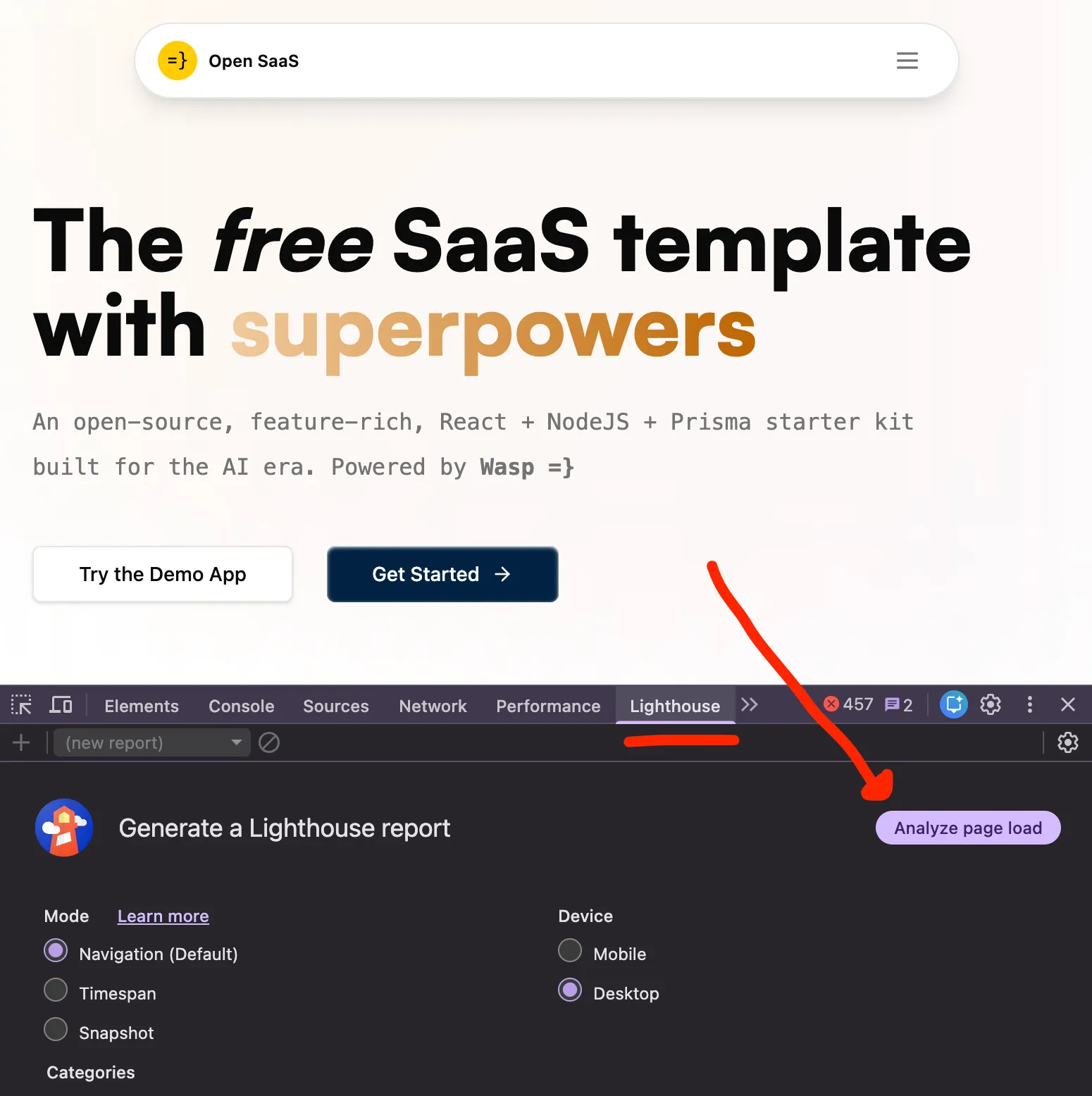
Run a Lighthouse audit (Chrome DevTools → Lighthouse tab) before and after turning on prerendering to see the load and paint improvements for your own page.
You only want this for public, content-heavy pages: the landing page, pricing, FAQ, blog index, that kind of thing. Don’t prerender anything behind auth, because there’s nothing useful to prerender as it’s all user-specific content.
The mechanism depends on your stack, but every popular framework has a well-trodden path for it:
- Next.js: static generation via
generateStaticParams, or a full static export withoutput: 'export'. - Astro: it’s a static-site generator by default, so you’re already getting this for free.
- Remix / React Router: server-render or prerender routes on demand.
- Vite + React: add a prerender plugin like
vite-plugin-ssrorvike. - Wasp (what Open SaaS uses): add
prerender: trueto a route and it will write out the static HTML for you.
The specific tool matters much less than the outcome: your landing page returns real content on the first byte, and your client framework still hydrates and takes over so links, modals, and any interactive bits keep working the same way.
2. Add JSON-LD structured data
Section titled “2. Add JSON-LD structured data”Meta tags tell crawlers about a page. Structured data tells them what the page is. It’s the difference between “this page has the word ‘pricing’ in the title” and “this is a SoftwareApplication with the following offers”.
Most developers already know the first half of this: the meta tags in your HTML <head>. Those are your <title>, <meta name="description">, and the Open Graph and Twitter card tags that decide how your links look when they’re shared. They’re worth getting right, and Open SaaS already fills in the important ones for you, so you mostly just swap in your own copy. You can see how they’re wired up in the SEO & Performance guide.
Structured data is the half most people skip. It’s far less common than meta tags but just as important today, especially now that LLMs lean on it to figure out and recommend what your product actually is.
Schema.org is the vocabulary, and JSON-LD is the format Google (and most LLMs) prefer. You drop a <script type="application/ld+json"> into your HTML, and that’s it. There’s no rendering impact, no layout shift, nothing to style.
For a SaaS landing page, the types worth including are:
SoftwareApplication: name, description, URL, category, image, pricing, license. Use the more specificWebApplicationsubtype if your app runs entirely in the browser.WebSite: site-level identity and links to social profiles.Organization: who’s behind the app.FAQPage: turns your FAQ section into rich snippets in Google, and gives LLMs clean Q&A pairs to cite when someone asks about your product.
LLMs love this stuff because it’s unambiguous. Instead of inferring what your product is from marketing copy, they can read a structured record that says exactly what it is, what it costs, and who makes it. It’s basically a machine-readable elevator pitch.
Here’s a complete example you can drop into any React app. It’s the trimmed SchemaMarkup component we ship in Open SaaS, but there’s nothing framework-specific about it. The same JSON object works as a plain <script> tag in any HTML page:
const schema = {  "@context": "https://schema.org",  "@graph": [    {      "@type": "SoftwareApplication",      "@id": "https://your-saas-app.com/#software",      name: "Your Open SaaS App",      description: "Your app's main description and features.",      url: "https://your-saas-app.com",      applicationCategory: "BusinessApplication",      operatingSystem: "Cross-platform",      image: "https://your-saas-app.com/public-banner.webp",      offers: { "@type": "Offer", price: "0", priceCurrency: "USD" },    },    {      "@type": "WebSite",      "@id": "https://your-saas-app.com/#website",      url: "https://your-saas-app.com",      name: "Your Open SaaS App",      description: "Your app's main description and features.",    },  ],};
export function SchemaMarkup() {  return <script type='application/ld+json'>{JSON.stringify(schema)}</script>;}
You import it once into your landing page and forget about it. Because the landing page is prerendered (see step 1), the script ends up inlined in the static HTML, which is exactly where crawlers and LLMs want to see it.
If your landing page has an FAQ section, add a FAQPage entry too. It’s one of the highest-leverage additions for both Google rich snippets and AI answers, because Q&A is already the shape LLMs want to quote.
When you’re done, validate with Google’s Rich Results Test and the Schema.org validator before deploying.
3. Publish an llms.txt file
Section titled “3. Publish an llms.txt file”llms.txt is a fairly new convention. It’s a markdown file at the root of your site that gives LLMs a curated index of the pages and resources you actually want them to know about.
It’s intentionally not a sitemap. A sitemap is exhaustive and aimed at crawlers. llms.txt is short, hand-picked, and aimed at language models trying to answer questions about you. Think of it as a README for your site, written for an AI.
The minimum useful version is:
# Your SaaS App
> One-line description of what your SaaS does and who it's for.
A longer paragraph giving context: the problem your app solves, the kind ofuser it serves, and the key value it delivers.
## Core pages- [Home](https://your-saas-app.com): Landing page with features, pricing, and FAQ- [Pricing](https://your-saas-app.com/pricing): Subscription plans and pricing
## Documentation
- [Docs](https://docs.your-saas-app.com): Product documentation and guides
## Resources
- [Blog](https://your-saas-app.com/blog): Updates, tutorials, and announcements- [GitHub](https://github.com/your-org/your-repo): Open source code
Drop it at public/llms.txt and it’s served at https://your-saas-app.com/llms.txt.
If you’ve got a docs site or a blog, it’s worth generating the file at build time so it stays current. We do that for opensaas.sh with a small Node script at scripts/generate-llms-txt.mjs. It reads the blog frontmatter and writes out an updated llms.txt before each deploy. About 90 lines, no dependencies, easy to lift into any project. There are also some plugins and npm packages that do this automatically, but I find that having custom control over what goes in the file is better.
Keep the file short and intentional. Think of it more like an index or a map so LLMs and agents know where to go to find the most relevant content. You can check out the Open SaaS llms.txt for a proper example in production.
How the three fit together
Section titled “How the three fit together”Here’s a quick recap on why these three tips fit together:
- Prerendering makes your content broadly visible to all crawlers and AI bots and improves site performance (e.g. load speed).
- JSON-LD makes that content understandable to search engines and AI.
llms.txtmakes your site easy for AI tools to navigate.
It’s important to note that without prerendering, your structured data will just sit in a JS bundle that classic and AI crawlers might never execute. So my advice would be to get prerendering for your landing page in place first, then layer the other two on top.
What’s new in Open SaaS
Section titled “What’s new in Open SaaS”We just shipped all three of these building blocks in the Open SaaS template, so if you’re using it you don’t have to wire any of this up from scratch:
prerender: trueis on by default for the landing page and pricing page.- A JSON-LD
SchemaMarkupcomponent lives atsrc/landing-page/components/SchemaMarkup.tsxand is already rendered on the landing page. - A placeholder
llms.txtships attemplate/app/public/llms.txt. - Docs, like the SEO & Performance, the guided tour, plus deploying guides all walk you through customizing all of it before you ship:
- The
headmeta tags in the main config file (title, description, OG tags). - The schema object in
SchemaMarkup.tsx(name, URL, description, FAQ entries). - The
public/llms.txtfile (replace placeholder URLs and copy).
- The
It’s about 15 minutes of work and your landing page is in good shape for both search engines and the AI side of search.
Wrapping up
Section titled “Wrapping up”If you only do one of these, do prerendering. It fixes the foundational problem (content not in HTML) that everything else depends on. Once that’s in, JSON-LD and llms.txt are both small, isolated additions with outsized payoff.
If you want a working reference for all of it, Open SaaS is free and open-source, and the GitHub repo has the actual code for the schema component, the llms.txt generator, and the prerendered routes. If you build something cool with it, drop in our Discord and let us know.
And if you found this useful, a star on GitHub helps more devs find the project. Thanks for reading.